What Is JuiceMind?
JuiceMind is a K-12 computer science education platform that gives teachers and students everything they need to teach and learn coding, all in one place. It combines a powerful online IDE, interactive quizzes, and standards-aligned curriculum designed specifically for the classroom.
Founded in 2021 by Philippe Rivard and Ryan Dehmoubed, JuiceMind was built to solve a problem that K-12 CS teachers know all too well: juggling multiple tools just to run a class. Instead of switching between a code editor, a grading tool, a quiz platform, and a curriculum provider, JuiceMind brings it all together.
Who Is JuiceMind For?
JuiceMind is built for K-12 computer science teachers and their students. Whether you teach AP Computer Science A, AP Computer Science Principles, introductory Python, web development, or any other CS course, JuiceMind is designed to fit your classroom.
Teachers use JuiceMind to assign coding exercises, grade student work, monitor progress, and deliver interactive lessons. With our all-in-one curriculum, everything you need for your class is already built in: lessons, coding exercises, quizzes, and assessments, so you don't have to piece together resources from multiple platforms. Students use it to write, run, and debug code directly in their browser. No downloads, no setup, no headaches.
The JuiceMind IDE
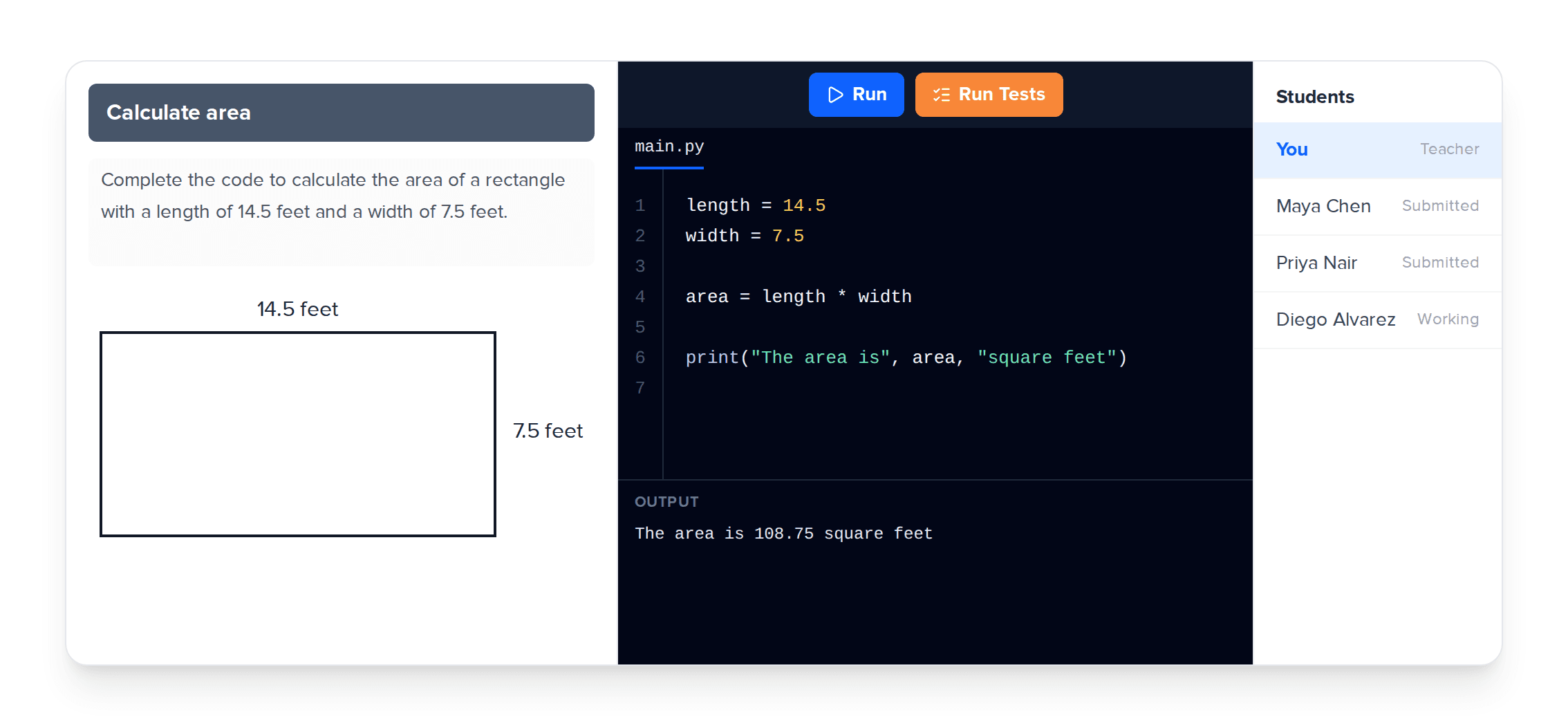
At the core of JuiceMind is a web-based IDE that runs entirely in the browser. Students can code from any device, including Chromebooks, tablets, and school laptops, without installing anything.
The IDE supports 12+ programming languages including Python, Java, HTML/CSS/JavaScript, C++, C#, Scratch, Python Turtle, Pygame, Tkinter, Java Swing, p5.js, and CMU Graphics.
Key features of the IDE include:
- Automated grading: Configure unit tests and code analysis to provide students with instant feedback, saving teachers hours of manual grading.
- Code review: View, annotate, and comment on student code directly in the IDE.
- Academic integrity tools: Disable copy-paste, monitor activity in real time, and review each student's step-by-step coding history.
- Real-time collaboration: Students can work together on group projects simultaneously.
- Built-in debugger: Step through code line by line to help students understand program execution.
- LMS integration: Works with Google Classroom, Canvas, and Schoology via LTI.
Interactive Quizzes
JuiceMind includes a built-in quiz platform, think Kahoot, but for coding. Teachers can create interactive, timed quizzes that test students on programming concepts, syntax, and logic. Quizzes are integrated directly into courses, so students stay in one platform instead of switching between tools.
Standards-Aligned Curriculum
JuiceMind offers a library of pre-built, standards-aligned CS courses that teachers can use out of the box or customize to fit their needs. Available courses include:
- AP Computer Science A (Java)
- AP Computer Science Principles
- Introduction to Python
- Introduction to Java
- Web Development (HTML/CSS/JS)
- Introduction to AI
Each course comes with lessons, coding exercises, and assessments, all editable by the teacher. You can also build your own course from scratch using JuiceMind's course editor.
What Makes JuiceMind Different?
There are other CS education platforms out there, so what sets JuiceMind apart?
- Built for K-12 from day one. Unlike platforms that started as professional developer tools and added education features later, JuiceMind was designed for classrooms from the start. Every feature is built with teachers and students in mind.
- All-in-one platform. IDE, curriculum, quizzes, grading, and collaboration, all in one place. No more stitching together five different tools.
- Free tier available. Many core features, including the sandbox IDE, student input, and basic assignment management, are free for teachers.
- Works on any device. Because it's entirely browser-based, students can code from Chromebooks, iPads, or any device with Chrome.
- Teacher-first design. Features like automated grading, plagiarism detection, and code commenting exist because teachers asked for them.
Getting Started with JuiceMind
Getting started is simple. Teachers can sign up at juicemind.com, create a class, and start assigning coding exercises in minutes. Students join with a class invite link. No account setup required.
Whether you're a veteran CS teacher looking for a better platform or a teacher picking up CS for the first time, JuiceMind gives you the tools to run an effective, engaging class without the complexity.